What is a Content Delivery Network (CDN)? How It Works and What It Costs
8 min read
Cloud 101
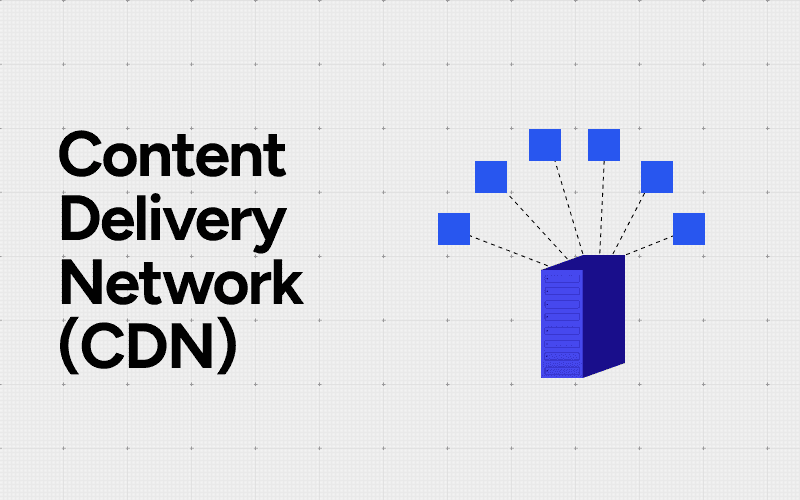
Table of Contents
A content delivery network (CDN) is a geographically distributed group of servers that caches and serves web content, including HTML pages, JavaScript files, stylesheets, images, and video, from a location physically close to each end user. The result:
Faster page loads for users on any device or geography
Less load on the origin server during traffic spikes
Lower bandwidth bills, since cached requests skip your origin
A CDN is also called a content distribution network, and the two terms mean the same thing.
If you've watched Netflix without buffering or bought something on Amazon during a holiday sale, you've used a CDN. A CDN sits between your origin server and users, quietly absorbing traffic so your site doesn't fall over.
What is a CDN, in plain English?
Think of a CDN as a network of warehouses for web files. Instead of every user in Texas, Oregon, and Florida pulling a video from one server in Virginia, copies of that video sit on hundreds of edge servers around the country. When a user hits play, the file streams from the closest warehouse, not the central one.
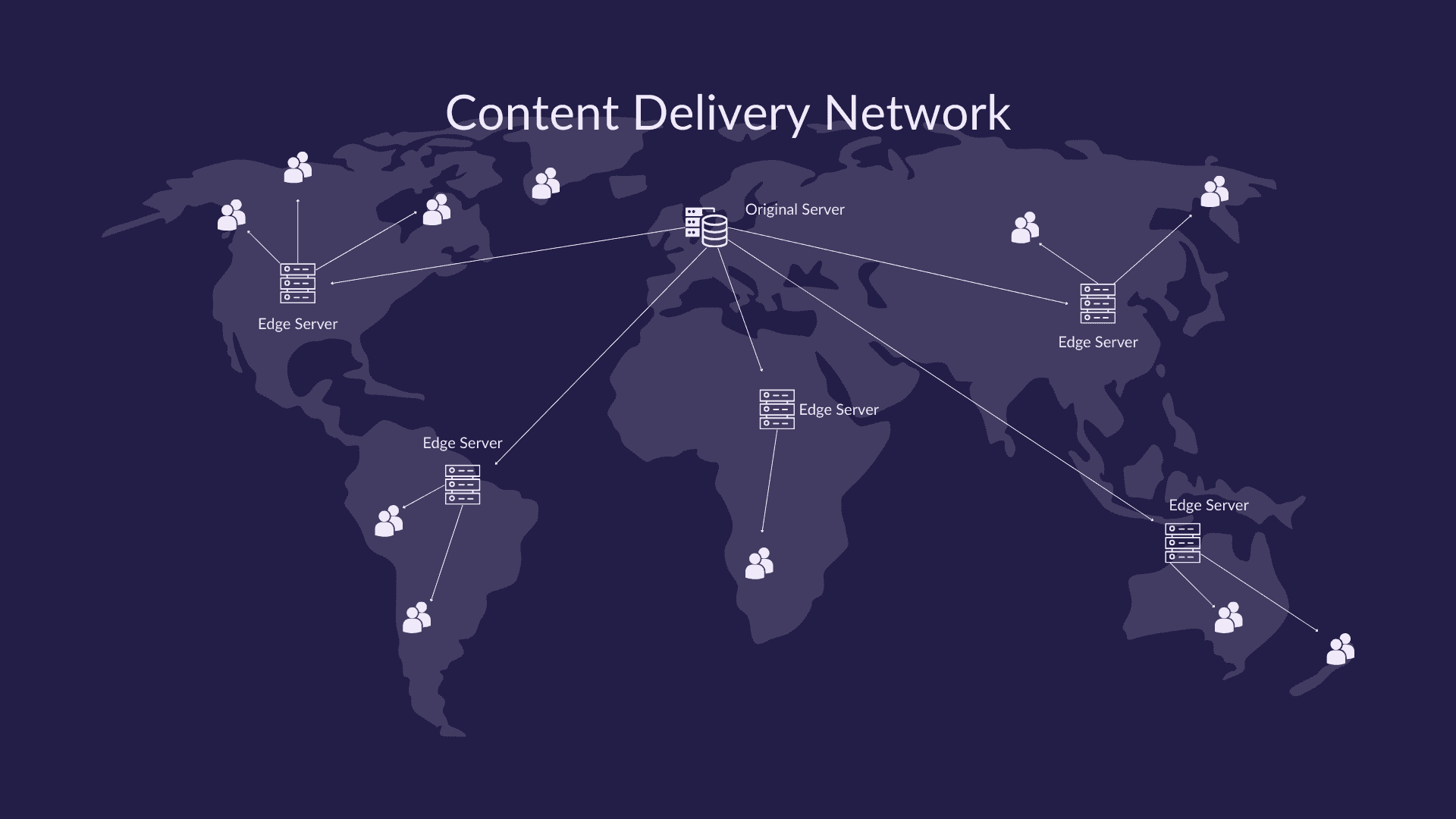
Whether you call it a content delivery network or a content distribution network, the job is the same: shorten the physical distance between your files and the people requesting them. US providers include:
Cloudflare (free tier, flat per-feature pricing)
Amazon CloudFront (per-GB egress, AWS-native)
Akamai (enterprise-quoted, the oldest player)
Fastly (developer-focused, real-time config)
Google Cloud CDN (per-GB egress, GCP-native)
Netflix runs its own version called Open Connect, with appliances inside ISP data centers. Whichever provider you pick, CDN spend becomes part of your service's unit economics the moment traffic scales.
How does a CDN work?
A request to a CDN-backed site follows a specific path. A user types a URL. Their DNS resolver gets back an IP address routed through anycast: many servers share one IP and the network routes the request to the closest of them. That request lands at a Point of Presence (PoP), which is a CDN data center close to the user. Inside the PoP, an edge server checks its cache.
If the file is cached and still fresh (within its TTL, or time-to-live), the edge server returns it immediately. That's a cache hit. If it's missing or expired, the edge server fetches it from the origin server (your actual web host), stores a copy, and serves it. That's a cache miss. The next user in that region gets the cached copy.
Some CDNs add an origin shield, a middle-tier cache between edge PoPs and your origin. It dedupes requests so your origin only sees one fetch per file, even if 50 edge PoPs all need it. For how this works at AWS specifically, see our breakdown of CloudFront.
None of this is exotic under the hood.
"The CDN jargon became less magical when I realized CloudFlare was just a tuned and managed NGINX-as-a-service." Hacker News commenter
That's roughly correct. Strip away the marketing and a CDN is a globally distributed reverse-proxy cache with smart routing, TLS termination, and a web application firewall (WAF) bolted on.
What are the core benefits of a CDN?
Performance: Cutting physical distance cuts latency. A request that travels 50 miles instead of 2,500 miles loads faster. That's the whole game. According to Cloudflare's CDN learning page, most internet users now hit a cached copy on the edge rather than the origin.
Cost: Egress from your origin gets expensive at scale. If a CDN serves 95% of requests from cache, your origin only pays bandwidth for the other 5%. CDN per-GB rates are usually lower than cloud egress rates anyway, so the math compounds. This is where understanding the difference between ingress and egress actually pays off.
Reliability: If one PoP goes down, requests reroute to the next nearest one via anycast. If your origin goes down, users still get cached pages. Most CDN providers publish four-nines edge uptime in their SLAs, which is harder to match with a single origin server.
Security: CDNs sit in front of your origin, so they absorb DDoS attacks before traffic reaches you. TLS/SSL termination at the edge means certificates and HTTPS happen at the PoP. Most providers bundle a WAF that filters SQL injection, cross-site scripting, and bot traffic. Cloudflare's own DDoS threat report documents mitigating a 5.6 Tbps attack at the edge before the customer origin ever saw it.
Those four benefits are what every CDN vendor sells. The thing they don't lead with is the bill.
What does a CDN actually cost?
CDN pricing has two meters: bytes delivered (egress) and requests served. Most providers bill per GB transferred plus per 10,000 HTTP/HTTPS requests. The per-GB rate varies by region. AWS CloudFront pricing lists US and Europe egress at roughly $0.085 per GB for the first 10 TB, climbing to $0.110 in Africa and the Middle East, $0.120 in Japan, and $0.140 in India. South America runs higher still. The cheapest and most expensive regions sit roughly 3x apart for the same byte, which matters for US sites with international audiences.
Cache-hit ratio is the single biggest cost lever you control. If your CDN serves 70% of bytes from cache, your origin pays for the other 30%. Push that ratio to 95% and origin egress drops by 6x. Tuning cache TTLs, normalizing query strings, and ignoring useless cache-busting parameters are some of the highest-ROI moves a platform team can make. For a deeper look at how this lands on an AWS bill specifically, see our walkthrough of data transfer charges.
Origin shield is a paid feature on most CDNs, but it usually pays for itself once you have more than 20 PoPs hitting your origin. You pay a small per-GB fee for the shield tier in exchange for collapsing 50 origin fetches into one.
Cloudflare took a different bet. Their free tier covers unlimited bandwidth for most use cases, and their paid plans don't charge per-GB egress at all. According to Cloudflare's published plans, this is their broader anti-egress-tax position. CloudFront charges per GB; Cloudflare charges per feature. Which is cheaper depends on your traffic shape.
CDN bills also have a nasty failure mode: you can DDoS yourself.
"Imagine the terror when I woke up the next day to see the AWS Billing alert email saying I already owed $1,484!" Hacker News, "I DDoSed myself using CloudFront"
That post is required reading. A misconfigured infinite loop, a public S3 link going viral, or a recursive Lambda triggering CloudFront fetches: any of these racks up four-figure bills in hours. CDN cost predictability matters as much as the unit rate. This is the kind of problem a FinOps practice is built to catch.
What is the difference between push, pull, and peer-to-peer CDNs?
CDNs come in three flavors. With a pull CDN, you point your DNS at the CDN and it fetches files from your origin on demand the first time anyone requests them. Cloudflare and CloudFront default to this. Easy to set up, but the first user in each region eats the latency.
With a push CDN, you upload files to the CDN ahead of time. The CDN doesn't talk to your origin during normal operation. Better for large static libraries that change rarely, like software downloads or video catalogs.
A peer-to-peer CDN uses end-user devices as edge nodes, with each viewer also seeding chunks to nearby viewers. BitTorrent-style. According to Wikipedia's CDN entry, P2P CDNs are common for live video and large file distribution but rare for typical web assets.
Most production sites use a pull CDN.
Do you actually need a CDN?
Probably less than you think.
"The hard part of building a CDN is to know when you need it. 99.9% of all websites with CDN do not need it." Hacker News commenter
That's harsh but not wrong. If your site serves a few thousand users a day, mostly from one country, on a modern host with HTTP/2 and decent caching headers, a CDN buys you very little. Plenty of static sites have survived the Hacker News front page on a $5 VPS with no CDN, because static HTML is cheap to serve.
You probably need a CDN if any of these are true:
Your users are spread across three or more continents
You serve video or large media files
You've had origin outages during traffic spikes
You're a regulated target for DDoS attacks
Your origin egress bill is already higher than a CDN bill would be
You probably don't need one if:
Your traffic is regional
Your files are small and mostly text
Your origin is already a managed service with good caching headers
Your load is predictable
Don't add a CDN because the AWS Well-Architected guide said to. Add one when you can name the specific problem it solves for you.
How do you keep CDN costs under control?
The first rule: measure your cache-hit ratio and treat it as a primary SLO. Most teams should target above 90% for static assets and above 70% overall. Anything below that means you're paying origin egress for files that should be edge-cached.
The second rule: alert on egress anomalies. The CloudFront bill shock story above is the canonical pattern. Public links go viral, recursive functions fire in loops, a bad deploy disables caching headers. Without anomaly detection on CDN spend, you find out on the monthly invoice, four figures late.
The third rule: forecast CDN spend the same way you forecast EC2 or RDS. Egress costs scale with traffic, and traffic scales with product launches, marketing campaigns, and viral moments. Forecasting CDN line items alongside compute keeps surprises out of finance reviews.
Beyond that, the boring fundamentals do most of the work:
Set sensible TTLs on every cacheable response
Use immutable filenames for versioned assets
Kill query-string variations that don't change the response
Enable origin shield once you have meaningful PoP fan-out
Review your top URLs by bytes-served every month
A handful of cloud cost management tools can surface this, but the discipline matters more than the dashboard.
In our experience, CDN bills tend to land between 5 and 15% of cloud spend at companies serving real traffic. They're also one of the most controllable line items on the invoice once someone owns them.
FAQs
What does CDN stand for?
CDN stands for content delivery network. You'll also see it called a content distribution network. The two terms are interchangeable.
How does a CDN actually speed up a website?
It caches copies of your files on edge servers near your users. Requests get served from the nearest PoP instead of traveling to your origin, which cuts latency and round-trip time.
Is a CDN expensive?
It depends on your traffic and provider. Cloudflare's free tier covers most small sites at $0. CloudFront publishes per-GB rates around $0.085 in the US. Akamai is typically enterprise-quoted with negotiated commits. Other regions run roughly 1.3x to 3x higher than US rates.
What's the difference between a CDN and a web host?
A web host stores your origin files and runs your application. A CDN caches and delivers those files from edge locations close to users. You need both, and they complement each other.
Do I need a CDN if I already use AWS or Cloudflare?
AWS includes CloudFront as a separate service you turn on. Cloudflare's proxied free plan routes traffic through its CDN by default, but a DNS-only setup does not. Using one of these providers doesn't automatically mean your traffic is on a CDN; you have to configure it.
If you want CDN spend visible alongside the rest of your cloud bill, that's the kind of problem Amnic was built to solve. Our insights agent surfaces egress anomalies and cache-hit drops before they hit your monthly invoice.
Better visibility and management into AI Tokens?
Start with a 30 day trial
Connect leading LLMs
24 hour time to value
Stay ahead of AI Spend

Make AI spend visible, controllable, and accountable.
Gain insights into your AI token costs at a team, customer, business unit and individual user level to measure and manage AI utilization.
Recommended Articles
What Is Cloud Cost Observability? Definition, Capabilities and Tools
Read More
Cloud Cost Anomaly Detection: How to Catch Surprise Spend Early
Read More

Cloud Cost Allocation Methods: 5 Models to Assign Cloud Spend Accurately
Read More

10 Cloud Cost Observability Metrics You Should Track
Read More

Cloud Adoption: Key Drivers, Challenges and How to Get It Right
Read More
12 Cloud Cost Management Strategies for 2026 (With Real Examples)
Read More






